The Warning Was Good. It Just Stopped Short.
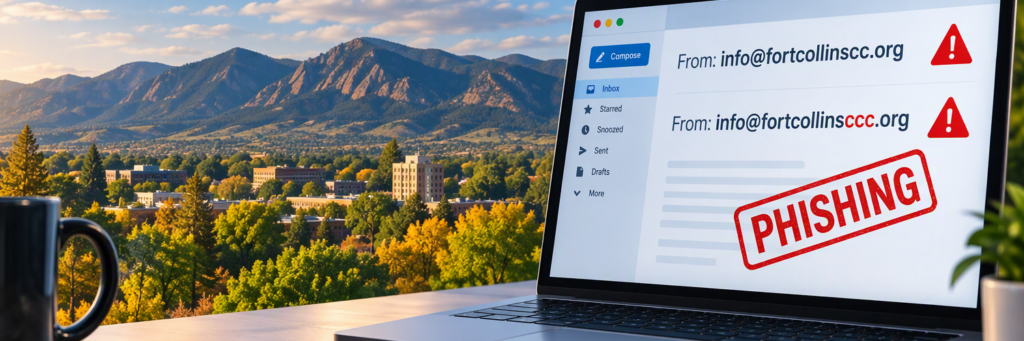
An organization in our Fort Collins business network recently emailed its members about scammers impersonating it. Someone had registered a domain that was one extra letter off from the real one, copied the logo and branding, and started sending email that looked like it came from a group a lot of local business owners trust.
The warning they sent out was solid. But it left out the one step that actually stops the next victim. So let’s talk about what they got right, what was missing, and exactly what to do when someone puts a trusted name on a fake email.
What they got right
Their advice came down to four things, and all four are worth repeating:
- Check the sender’s full email address. Look for misspellings, extra letters, or a domain you don’t recognize. A familiar name or logo doesn’t prove anything.
- Be careful with unexpected requests. Slow down on anything asking you to click a link, open an attachment, give up personal information, or act fast.
- Verify before you trust it. If something feels off, contact the organization with a phone number or email address you already know is real.
- Don’t click, open, or reply. Take a screenshot showing the full sender address and send it to the real organization. Use your email provider’s Report Phishing button too.
If every business owner did just those four things, a lot of these scams would go nowhere.
What was missing: getting the domain taken down
Here’s my problem. A warning protects the people who read it. Everyone else on that fake domain’s list is still getting the emails, and the domain stays live until someone reports it.
Reporting it isn’t hard, and you don’t need to be in IT to do it.
- Find out who registered the domain. Go to ICANN Lookup and type in the fake domain. It will show you the registrar, the company the domain was bought through, along with that registrar’s abuse email and phone number. Email them the phishing message as evidence and ask them to suspend the domain. If they don’t act, you can escalate with an ICANN Compliance complaint. ICANN doesn’t take domains down itself, but it does hold registrars accountable.
- Report it to the anti-phishing community. Forward the phishing email, as an attachment if you can, to [email protected]. The Anti-Phishing Working Group (APWG) shares that information with security companies, browsers, and law enforcement.
- Get browsers to warn people. Report the fake website address to Google Safe Browsing and to Microsoft. Once it’s flagged, Chrome and Edge start warning anyone who tries to open it.
- If money or passwords were involved, go to the authorities. File a complaint with the FBI at IC3 and with the FTC at ReportFraud.ftc.gov. You can also report it to CISA at [email protected] or (888) 282-0870.
That’s maybe 15 minutes of work, and it protects people who never got the warning.
Cybersecurity steps for Fort Collins small businesses
The original warning was written for the organization’s own members. If you run a business, there are a few more things I’d want you and your team doing.
Call before you pay. Any request to pay an invoice, change bank details, or buy gift cards gets a phone call to a number you already have, not the one in the email. Every time. This one habit stops more fraud than any software we sell.
Look at the reply-to address, not just the name. A display name can say anything. Hover over links before you click, too, and see where they really go.
Have a plan for “I already clicked.” Someone on your team will eventually click. When they do, they should change the password right away, sign out of all their sessions, call your bank if anything financial was touched, and call your IT provider. Make sure they know they won’t be in trouble for speaking up. The fast report matters more than the mistake.
Turn on multi-factor sign-in. On email and anything financial. A stolen password is a lot less useful when it isn’t enough to get in.
Block the lookalike. Once you know a fake domain exists, your IT provider can block it in your email filters so your staff never see the next one.
Lock down your own domain. Three email settings called SPF, DKIM, and DMARC tell the world which servers are allowed to send email as your business, and what to do with anything that fails the check. If they aren’t set up, or DMARC is set to monitor only, someone can send email that appears to come from your real address. Ask your IT provider to show you yours.
Make sure the Report button actually works. In Microsoft 365 business accounts, Outlook’s Report Phishing button only appears if your admin has turned it on. Worth checking.
Why local IT support matters when a lookalike shows up
Scammers don’t impersonate organizations nobody trusts. They go after the chambers, associations, vendors, and banks we’ve all learned to open without thinking. That trust is what they’re stealing.
As a managed IT services provider in Fort Collins, this is the kind of thing we handle for clients every week: blocking the lookalike, reporting the domain, and checking that their own email is locked down. It’s a core part of our cybersecurity work.
Warnings are good. But the businesses that come through this stuff fine are the ones with a simple plan everyone already knows: verify, report, and get the fake taken down.
If you’re not sure your email would catch a lookalike domain, or that your own domain is locked down, let’s take a look together. Book a 20-minute 2027 Business Readiness Review.
Frequently asked questions
How do I report a fake domain impersonating my business? Look up the domain at lookup.icann.org to find its registrar, then email the registrar’s abuse contact with the phishing email attached.
What is a lookalike domain? It’s a web address that’s one letter or character off from a real one, registered to make fake emails look legitimate.
How do I stop people from sending email as my business? Set up SPF, DKIM and DMARC on your domain, with DMARC enforced rather than set to monitor only.
Do small businesses in Fort Collins really get targeted? Yes. Scammers go after local organizations because people trust them.